brunn

Knowledge · Projects · Tasks · Skills · Secrets

A shared, portable workspace for you and all your AI agents.

Build a knowledge base your agents can maintain. Manage projects and tasks together. Reuse your skills and credentials across compatible AI apps.

Free to start. Use your own AI account. We add people a few at a time. Register See pricing →

Example conversationYou + Codex + Brunn
You

Compare the cabinet quotes and save the results in our kitchen project.

Codex

I’ve saved the comparison with links to both quotes, and added a task to confirm delivery costs.

You · next conversation

What’s left to decide for the kitchen?

Codex

The cabinet supplier, countertop finish and installation date.

The quotes, agreed budget and open tasks are in Brunn.

Connect your AI appCodexChatGPTClaudeCompatible local and cloud agentsCheck setup requirements →

Knowledge

A knowledge base your agents can read and update.

Save notes, research, files and decisions in Brunn. Your connected agent can use that material, add new information and update the saved documents as you work.

It works with the AI app you already use. The next conversation can use the same project context, even if you never switch agents.

  • Source material and conclusions togetherRead the summary and follow links to the original information.
  • Documents you can inspectOpen the saved work in Brunn, without searching through past chats.
  • Updates across conversationsAsk your agent to save a decision or revise an outdated note.
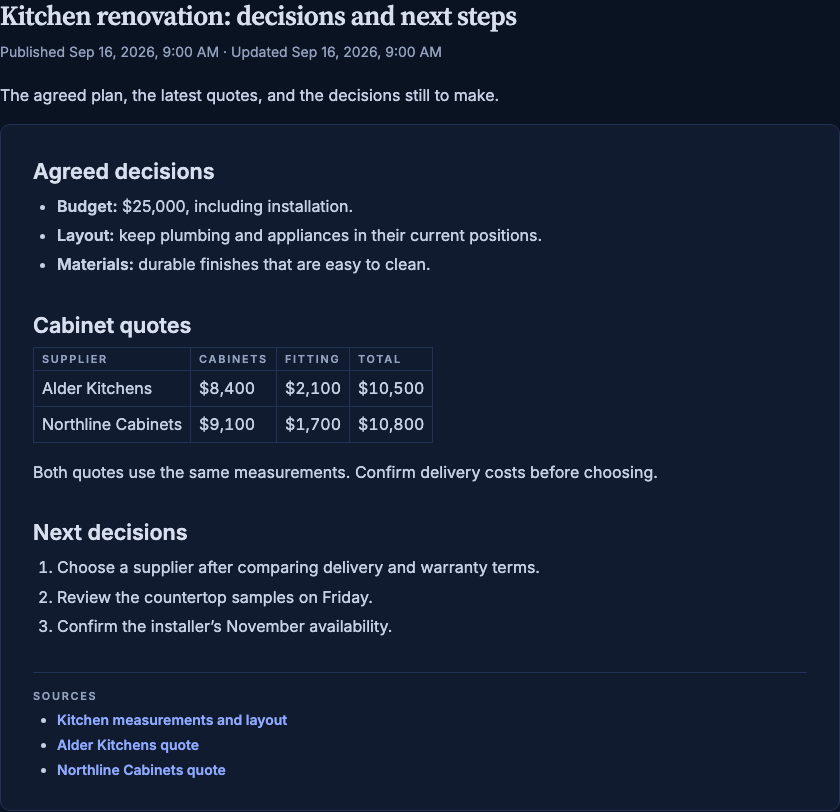
Brunn document reader showing a kitchen project’s agreed budget, cabinet quote comparison, next decisions and source links.
Actual Brunn document reader · fictional exampleView full size ↗

Projects & tasks

Manage the work with your agent.

Your agent can create tasks, update priorities, record decisions and mark completed work done. You can review the same tasks and project state in Brunn.

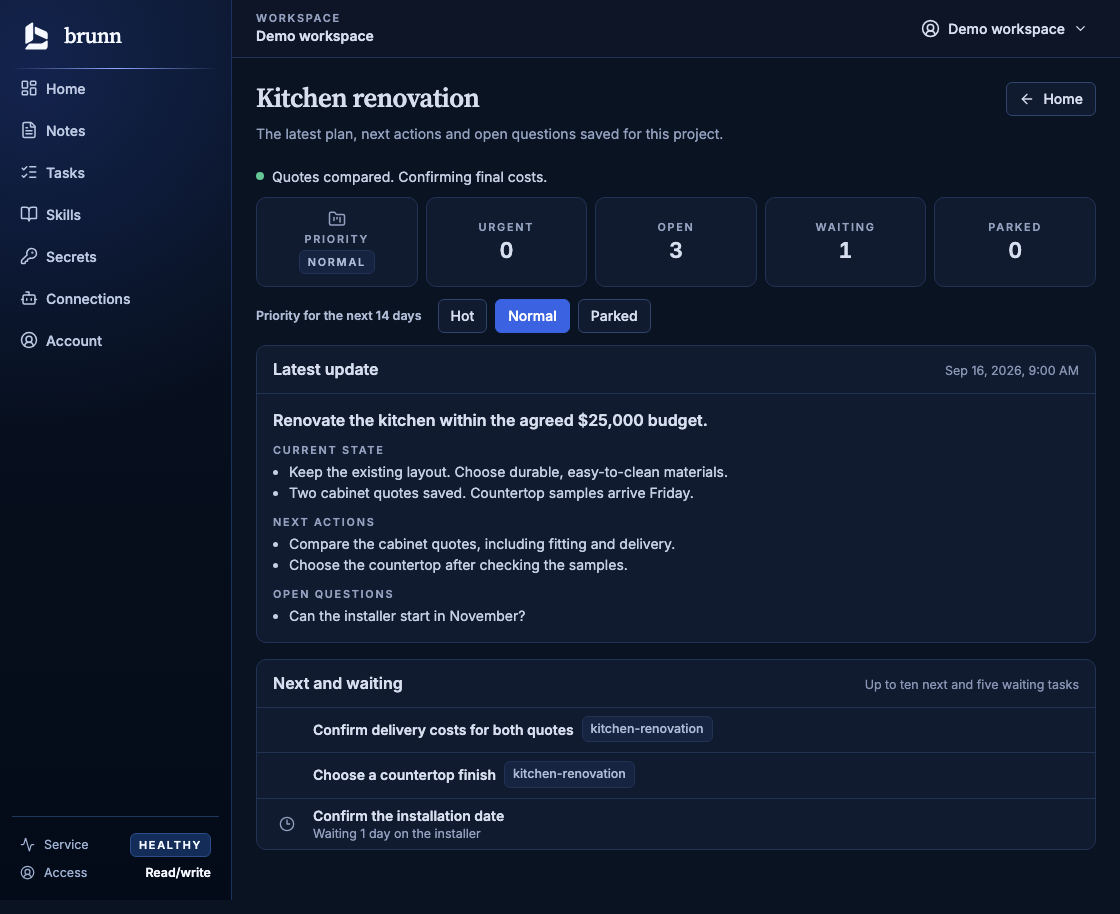
Brunn’s kitchen renovation project, with the agreed plan, next actions, open questions, two next tasks and one waiting task.
Actual Brunn web app · fictional project and tasksView full size ↗

Tasks your agent can update

Create and complete tasks in conversation. Review or edit them yourself in the shared list.

Project context beside the tasks

See the latest decisions, unanswered questions and next actions for each project.

Priorities beyond a due date

Distinguish urgent work, quick tasks and items waiting on someone else.

Portable skills

Your instructions, synced across agents.

Turn a repeatable task into a skill: how to compare quotes, prepare a meeting or write a report. Save the instructions and supporting files together in Brunn.

Publish an update once. Connected local and cloud agents can load the current version when they need it. You can also download the skill as a portable package.

  • More than a promptInclude templates, references, scripts and other files the task needs.
  • One shared libraryManage the instructions in Brunn instead of maintaining a separate copy for each agent.

Updates take effect when an agent next loads the skill. Native skill installation and script execution depend on the client.

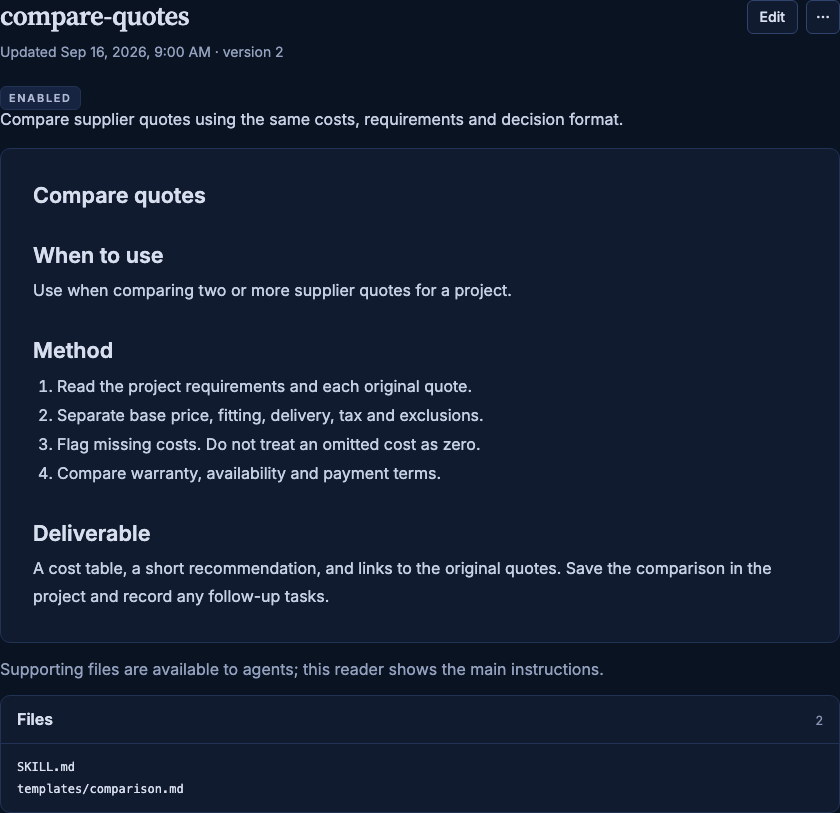
Brunn’s skill reader displaying compare-quotes: when to use it, comparison steps and the expected deliverable.
Actual Brunn skill reader · fictional skillView full size ↗

Secrets manager

Credentials stored separately from your notes.

Store API keys and other credentials in an encrypted vault. Give a trusted connected agent permission to retrieve them when it needs to use a service.

You manage which connections have secrets access. Access to your notes does not automatically include access to the vault.

Read the connection and permissions guide →

Encrypted in storage

Secret values are kept outside ordinary memory and excluded from search, embeddings, Dreamer input and ordinary exports.

Separate permission

A connection with secrets access can read and change the vault. That permission covers all secrets in the vault.

What the agent receives

When an authorized agent requests a secret, it receives the value. Its environment and AI provider then handle that value.

Private preview

Briefings, background updates and Siri.

These features are running in private preview. Automatic briefings, hosted Dreamer and the iPhone app are not included in customer plans yet.

Briefings from your work

Read a summary of project changes, upcoming tasks and decisions that need your attention, with links to the supporting information.

For the kitchen project: delivery costs still need confirmation, samples arrive Friday, and the installer has not replied.

Dreamer consolidation

Coming soon.

Dreamer reviews saved information, connects related notes and proposes consolidated views of people, projects and topics. It can update those views as new information supersedes old information.

Eligible proposals can be applied on a later run after a 24-hour review window. Questions and proposals needing a decision remain for review.

Siri on iPhone

Ask Siri to add a task, mark one complete, hear today’s list or look something up in your workspace. Answers are read from your saved notes, with the source shown on screen. Built for Siri AI in iOS 27, and it works with short phrases on earlier versions.

“Add order cabinet samples to my tasks in Brunn.” The task is saved to your Today list. Brunn refuses Siri requests while the iPhone is locked until you allow them in its settings.

Portability & control

Use the same workspace across your AI apps.

Connect another compatible agent when you want to. It can use the notes, tasks and skills already in Brunn, with the permissions you give it.

Shared context

Research in one app and continue in another. Your project records remain in the same workspace.

Access you control

Grant read-only access where appropriate. Review and revoke individual connections.

Exportable files

Export notes and files with a manifest. Download skills with their supporting files. Secrets stay outside ordinary exports.

Setup

Start with one useful project.

Existing users can connect now. New places open a few at a time.

  1. Add your starting information

    Save a project brief, research notes or a document you want your agent to use.

  2. Connect your AI app

    Follow the setup guide for your app, sign in to Brunn and choose the connection’s permissions.

  3. Do the work together

    Ask your agent to use the project, save its findings and record the next tasks. Return to those records in your next conversation.

Pricing

A generous free tier. Room to grow.

We expect the free tier to be enough for all but the heaviest users. Start with a useful second brain at no cost. Paid plans add space for larger libraries, file storage and more activity.

Start here

Free

$0/ month

A generous home for your everyday knowledge and skills.

  • 500 saved records
  • 1 MB of text
  • Text only; no file storage
  • 2,000 read units / month
  • 200 save units / month
  • Current versions of your content
Register for free

Coming soon

Starter

$5/ month

More room for your notes, skills and supporting files.

  • 2,000 saved records
  • 20 MB of text
  • 500 MB of file storage
  • 15,000 read units / month
  • 2,000 save units / month
  • Version history included

Coming soon

Personal

$10/ month

A larger library across your projects and AI apps.

  • 10,000 saved records
  • 100 MB of text
  • 2 GB of file storage
  • 50,000 read units / month
  • 10,000 save units / month
  • Version history included

Coming soon

Power

$20/ month

Our largest allowances for your heaviest workflows.

  • 50,000 saved records
  • 500 MB of text
  • 10 GB of file storage
  • 150,000 read units / month
  • 30,000 save units / month
  • Version history included

Prices in USD per month. Paid plans are not available yet. Free places open a few at a time. Use your own AI account; an AI subscription is not included.

How storage, usage and history work

Records and text share one allowance across your saved content, including skills and secrets. A read unit covers one agent search query or exact read; opening a working context uses five. A save unit covers up to 8 KiB of text and metadata. Larger saves use more units. Monthly usage resets at the start of each UTC calendar month.

Free keeps the current version of your content. Paid plans include version history within their retained-text limits: 250 MB for Starter, 1 GB for Personal and 5 GB for Power. Older document versions are generally retained for seven days after replacement; versions still needed by saved references can be kept longer. Embedding, transfer and request-rate limits also apply.

FAQ

Common questions.

Is Brunn useful if I only use one AI app?

Yes. Your agent can save research, maintain project notes and update tasks across conversations. You can return to the same agent with the previous work available in Brunn. Connecting another agent is optional.

How is this different from uploading documents to a chat?

Brunn provides a knowledge base that compatible connected agents can search and update. Notes, decisions and source material remain available across conversations. You can read the saved documents and follow their source links in the web app.

Which AI apps can connect?

Brunn connects to compatible local and cloud AI apps through remote MCP and OAuth. Setup guides cover Codex, ChatGPT and Claude. Support depends on the app, its plan and workplace settings. You use your own AI account; Brunn does not include an AI subscription.

How do skills stay in sync?

Publish a skill in Brunn. Connected agents can discover and load the current version, including its instructions and supporting files. Updates take effect when an agent next loads that skill. Native installation and script execution depend on the client. You can also download a portable skill package.

Can my agent read every secret?

Only if you grant that connection secrets access. That permission covers the vault, not an individual secret. Secret values are encrypted in storage and excluded from memory search, embeddings, Dreamer input and ordinary exports. An authorized agent receives the value when it requests it; the agent's environment and provider then handle that value.

Can I register now?

Yes. Sign up and verify your email to save a place. Free places have a hard limit and open in small groups, in signup order. We email you when yours is ready. Paid activation is planned to bypass the free queue. Automatic briefings, hosted Dreamer and the iPhone app remain private previews, outside customer plans.

Can I export my data?

Yes. Notes and stored files can be exported with a manifest. Skills can be downloaded with their supporting files. Secrets are excluded from ordinary exports. Free plans retain current content; paid plans add storage and version history within their allowances.

Is Brunn open source?

Not yet. There is no public source release or supported self-host setup available today.

Registration

We add people a few at a time.

Brunn is run by a small team. Places open in small groups so it stays fast for the people already using it. Sign up now and we’ll write when there’s one for you.

We’ll email to confirm your address, then once more when it’s your turn. No newsletter.